
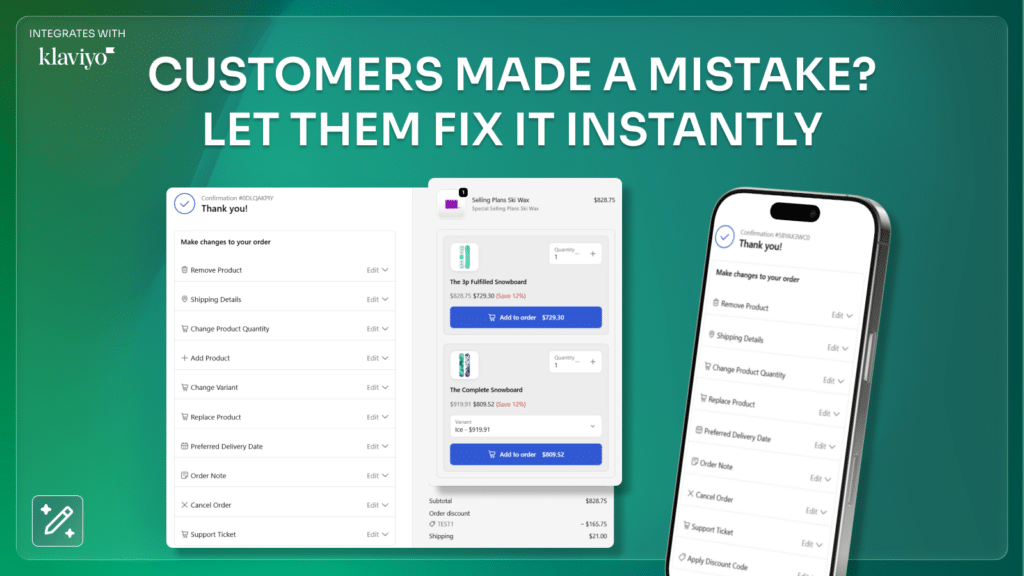
Customers frequently realize they made a mistake after completing checkout. They may want to change their shipping address, adjust quantities, switch a product variant, or add another item to the order.
Without an order editing solution, these requests usually turn into support tickets, refunds, or order cancellations.
A Shopify order edit app solves this problem by allowing customers to modify their order after checkout while keeping the original order intact.
Amendify is designed to give Shopify merchants full control over order editing while also unlocking new revenue opportunities through checkout and post-purchase upsells.
What Is a Shopify Order Edit App?
A Shopify order edit app allows customers to modify their order after checkout without contacting customer support.
Common order edits include:
• Updating the shipping address
• Changing product variants or sizes
• Adjusting quantities
• Adding new products to an order
• Removing products from an order
• Applying discount codes
Instead of cancelling orders and creating new ones, merchants can allow controlled edits that maintain the order while improving the customer experience.
For growing Shopify stores, this can significantly reduce support tickets and operational workload.
Why Merchants Need a Shopify Order Edit App
As stores scale, post-purchase change requests become increasingly common.
Customers often want to:
• fix a typo in their shipping address
• change the size or color of a product
• add another item to their order
• apply a discount code they forgot
Without order editing, merchants must manually intervene, cancel orders, or create replacements.
Allowing customers to edit their own orders saves time, reduces support overhead, and improves the shopping experience.
Let Customers Edit Their Entire Order
Amendify allows customers to safely edit their order after checkout through a dedicated order editing interface.
Merchants can allow customers to modify:
Shipping details
Customers can update their shipping address if they made a mistake during checkout.
Product-level changes
Customers can:
• change product variants
• increase or decrease quantities
• remove products
• add new products
Order-level changes
Merchants can also allow:
• order notes
• discount codes
• preferred delivery date
All edits update the order directly in Shopify while keeping fulfillment accurate.
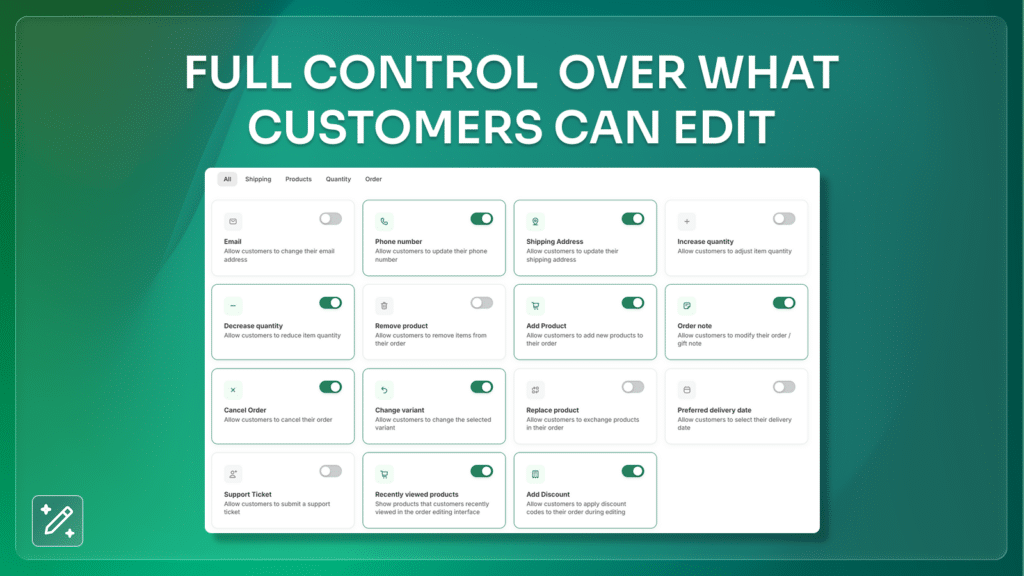
Full Control Over What Customers Can Edit
Merchants have full control over which order edits are allowed.
Amendify allows merchants to enable or disable specific edit permissions such as:
• email address updates
• shipping address edits
• variant changes
• quantity adjustments
• product replacement
• product removal
• order cancellation
This ensures merchants maintain complete control over the order editing experience.
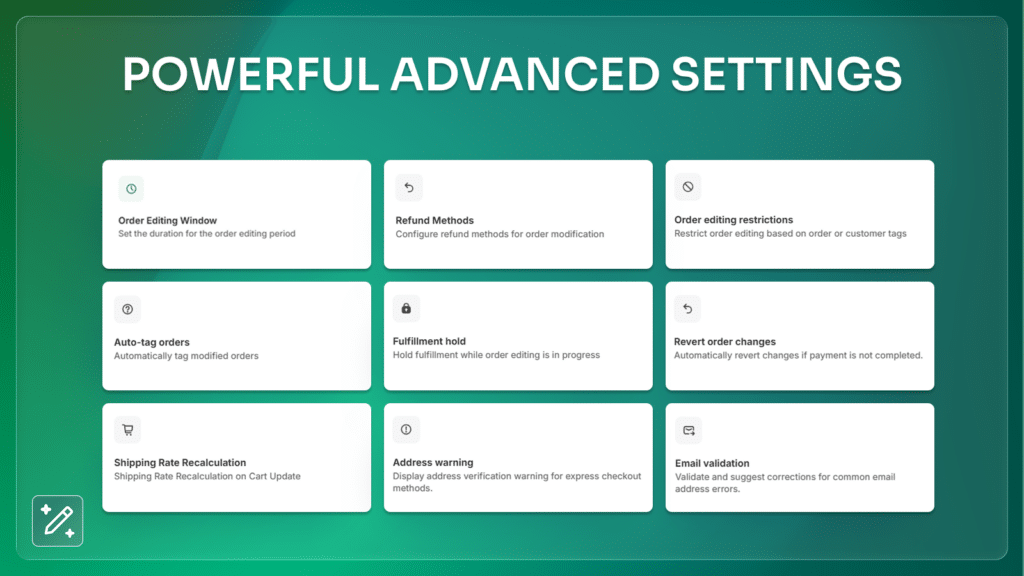
Advanced Settings for Maximum Control
Amendify also includes advanced controls that help merchants automate the editing process.
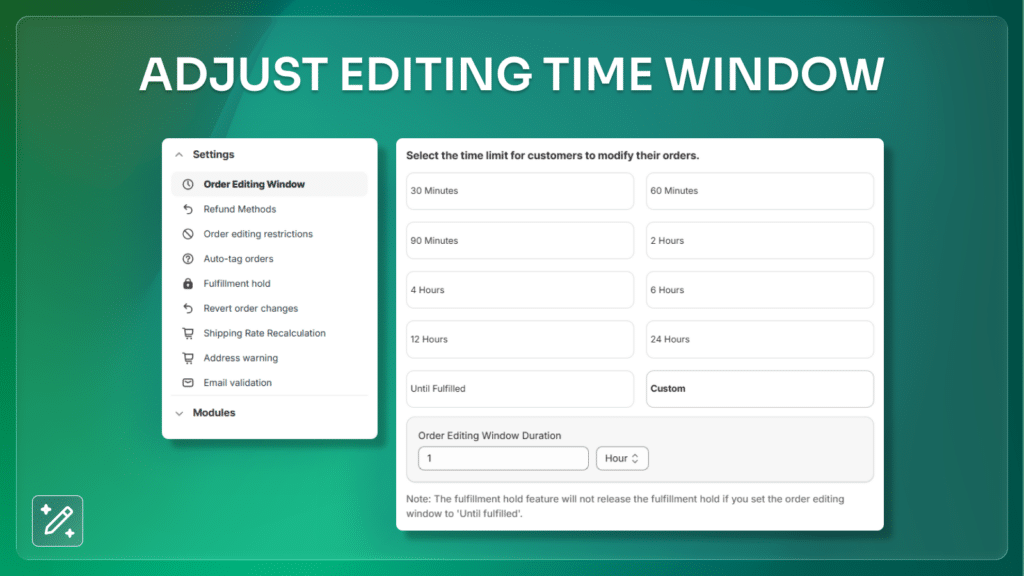
Order Editing Window
Merchants can define how long customers are allowed to edit their order after checkout.
For example:
• 30 minutes
• 1 hour
• 6 hours
• 24 hours
• until fulfillment
Order Editing Restrictions
Merchants can restrict edits based on customer tags or order conditions.
Fulfillment Hold
Orders can be automatically paused while customers make edits to ensure fulfillment accuracy.
Refund Methods
Configure how refunds are handled when order totals change.
Shipping Rate Recalculation
Automatically recalculate shipping rates when customers modify their order.
Increase Revenue with Checkout and Post-Purchase Upsells
Amendify doesn’t just enable order edits. It also helps merchants increase revenue with upsells.
Merchants can trigger upsell offers when customers modify their order or directly during checkout.
This creates an opportunity to increase average order value without disrupting the buying experience.
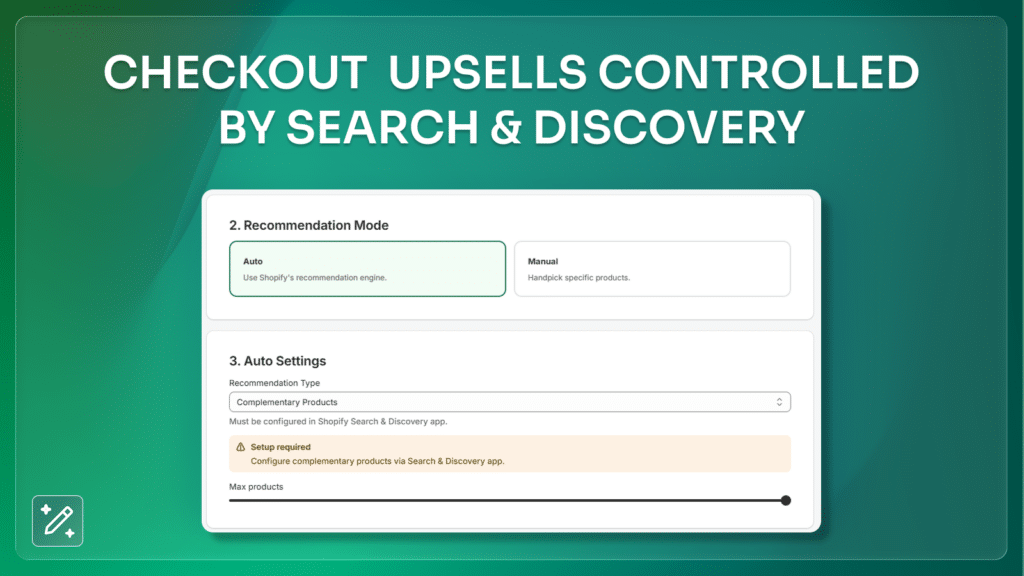
In-Checkout Upsells with Shopify Complementary Products
Amendify now supports in-checkout upsells, allowing merchants to display relevant products directly during checkout.
Instead of manually building upsell funnels, merchants can use Shopify’s Complementary Products and Related Products from the Search & Discovery app.
This allows upsell recommendations to be generated automatically.
Benefits include:
• automatic product recommendations
• faster upsell setup
• higher average order value
• native Shopify integration
This makes it easy for merchants to scale upsells across large product catalogs.
Translate to Any Language with Shopify Markets Support
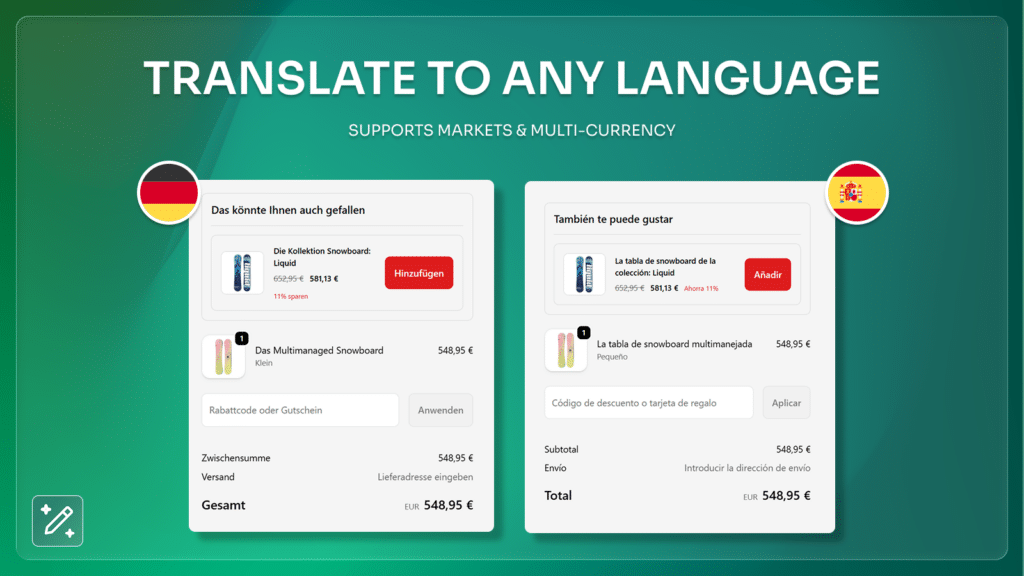
Amendify is built for global Shopify stores and fully supports Shopify Markets, allowing merchants to provide localized order editing and upsell experiences.
The app supports translations and multi-currency, making it easy to serve international customers without additional setup.
Merchants can translate customer-facing order editing and upsell content into multiple languages while displaying prices in the customer’s local currency.
This makes Amendify a strong fit for stores selling across multiple regions and markets.
Benefits of Shopify Markets Support
• Fully translatable customer experience
• Multi-language order editing and upsells
• Multi-currency support
• Compatible with Shopify Markets
• Better experience for international customers
Post-Purchase Upsells During Order Editing
Amendify can also trigger upsells when customers edit their order after checkout.
For example:
A customer updates their order and the app suggests a related product.
This creates a seamless opportunity to increase revenue while customers are already engaged with their order.
Klaviyo Integration and AI Customer Agent Support
Amendify integrates with Klaviyo, allowing merchants to send order editing and upsell events directly into their marketing automation flows.
Merchants can build targeted Klaviyo campaigns and automations using order edit activity, helping improve retention and post-purchase engagement.
Supported events include:
• Edited orders
• Accepted upsells
• Cancellation requests
• Support ticket submissions
• Reverted order edits
Amendify also supports Klaviyo Customer Agent integration, enabling AI-powered order editing through customer conversations.
Customers can request order changes directly through the Klaviyo customer agent, including:
• shipping address updates
• quantity adjustments
• cancellations
• product additions
• discount code application
This creates a seamless AI-powered support experience while reducing manual support workload.
Detailed Analytics to Measure Revenue Impact
Amendify includes analytics that help merchants understand how order editing impacts revenue.
The analytics dashboard tracks:
• orders modified
• revenue from edits
• upsell revenue
• attributed revenue
This helps merchants measure the true value of post-purchase interactions.
Key Features Summary
Amendify provides a complete Shopify order editing system including:
• customer order editing after checkout
• shipping address updates
• variant and quantity changes
• order editing time windows
• order editing restrictions and approvals
• checkout and post-purchase upsells
• complementary and related product recommendations
• analytics and reporting
Clean UI With Seamless Post-Purchase Upsells
Amendify’s customer interface is designed for clarity, speed, and conversion.
While customers correct their order, merchants can display relevant upsells—products related to the items being edited.
Benefits of integrated upsells:
- Increase AOV without any additional apps
- Let customers add higher-value variants
- Encourage bundles or complementary products
- Promote time-sensitive upgrades
The experience feels native and frictionless, helping merchants earn more from existing customers.
Detailed Analytics to Measure Revenue Impact
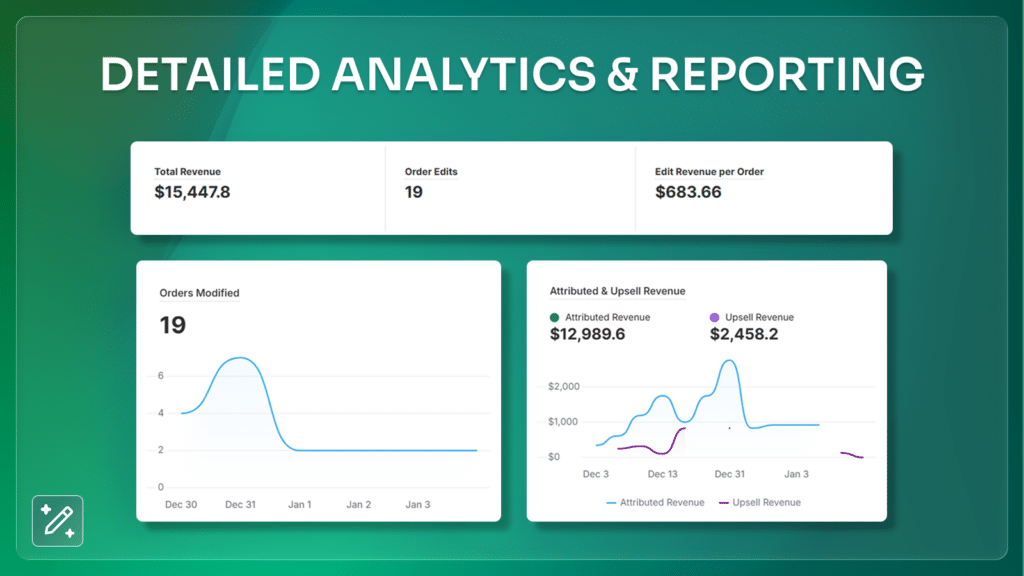
Amendify includes an advanced analytics dashboard that shows:
- Total revenue influenced
- Upsell revenue generated
- Orders edited
- Edit revenue per order
- Previous period comparisons
- Attributed vs upsell revenue
This helps merchants understand exactly how much money they’re saving and earning by offering post-purchase order editing.
Analytics is a major differentiator—most competitors either lack it entirely or offer only minimal insights.
Why Amendify Is the Leading Shopify Order Edit App
After analyzing dozens of solutions in the Shopify ecosystem, here’s why Amendify stands at the top:
1. It has the widest range of editable fields
From address details to product replacement, no other app covers this much ground.
2. It offers unmatched automation
Fulfillment holds, auto-tagging, restrictions, validation—everything works together.
3. It includes revenue-focused upsell tools
Most order-edit apps don’t offer upsells. Amendify does.
4. The interface is clean and intuitive
Both customers and merchants enjoy a frictionless experience.
5. It focuses on reliability and accuracy
Edits sync properly, workflows follow logic, and orders stay organized.
6. It reduces support load significantly
Most merchants see fewer emails asking for corrections—and more orders saved.
7. It prevents cancellations
Customers fix mistakes instead of abandoning their purchase.
Amendify was designed to look beyond simple editing. It handles post-purchase operations intelligently and efficiently.
8. Does Amendify support Shopify Markets?
Yes. Amendify supports Shopify Markets and allows merchants to provide localized order editing and upsell experiences.
9. Does Amendify support multiple languages and currencies?
Yes. Amendify supports translations and multi-currency experiences for international Shopify stores.
10. Does Amendify integrate with Klaviyo?
Yes. Amendify integrates with Klaviyo and allows merchants to send order editing and upsell events into marketing automation flows.
11. Can Klaviyo AI customer agent edit orders?
Yes. Amendify supports Klaviyo Customer Agent integration, allowing AI-powered order editing through customer conversations.
Key Features of Amendify
- Shopify order editing app
- Post-purchase order editing
- Customer self-serve edits
- Address correction
- Email and contact detail updates
- Product quantity changes
- Add/remove products
- Variant changes
- Replace products
- Upsell recommendations
- Order cancellation options
- Order note editing
- Fulfillment hold automation
- Refund method configuration
- Shipping rate recalculation
- Order editing rule restrictions
- Auto-tag modified orders
- Address validation
- Email verification
- Edit window control
- Detailed analytics dashboard
- Customers can edit orders after checkout
- Change shipping address after order
- Update product variants and quantities
- Add or remove products from an order
- Checkout upsells using complementary products
- Post-purchase upsells during order edits
- Shopify Markets compatibility
- Translations and multi-currency support
- Klaviyo integration and marketing events
- AI customer agent order editing
- Order editing rules and time windows
- Order edit analytics and reporting
Best Shopify Order Edit App
For Shopify merchants looking to reduce support tickets and increase order flexibility, a Shopify order edit app can be a powerful addition to the store.
Amendify allows customers to edit orders after checkout while giving merchants full control over editing rules, fulfillment holds, and upsell opportunities.
By combining order editing with checkout and post-purchase upsells, merchants can improve customer experience while increasing revenue.
Get the App now!


